A common mistake is treating every US document-photo request as a 600 × 600 file. A printed passport photo, a visa upload, DV entry and online passport renewal have separate instructions. Identify the application first; a dimension preset cannot establish acceptance.
Separate the application types
| Application | Starting point | What to check next |
|---|---|---|
| US passport with a paper form | 2 × 2 inch printed photograph | Full composition and photo-quality rules |
| US passport online renewal | Original digital photo workflow | The online system’s current upload instructions |
| US visa digital upload | Application-specific digital image requirements | File format, dimensions and byte limit |
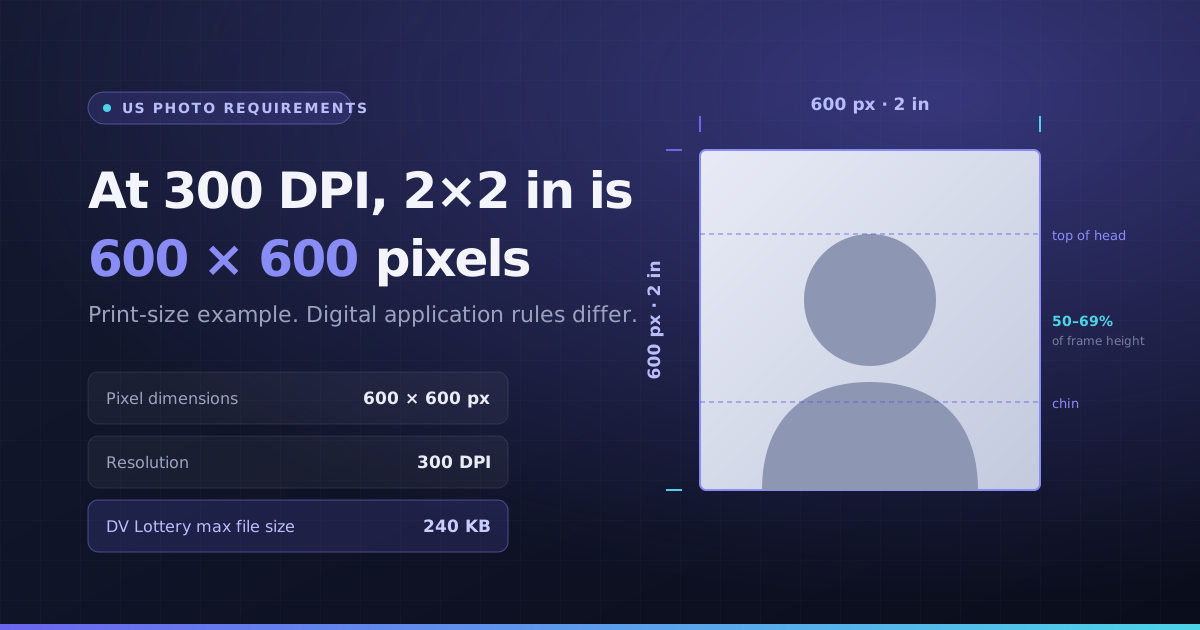
| DV entry image | 600 × 600 JPEG, no more than 240 KB | Current program instructions and composition rules |
- US State Department: printed passport photos
- US State Department: online renewal photos
- US State Department: digital visa image requirements
- US State Department: visa and DV photo instructions
Sources reviewed on 8 October 2026. The issuing authority’s current instructions take precedence. Program dates and application eligibility are outside this image-sizing guide.
Understand the 2-inch-to-pixel calculation
At 300 pixels per inch, 2 inches corresponds to 600 pixels. That is a print-resolution calculation: 2 × 300 = 600. It does not turn 600 × 600 into the correct digital requirement for every passport or visa workflow, and the downloaded file does not certify the physical print size.
Prepare only what your application permits
Start with a suitable original. A crop or resize can change the framing, but it cannot fix an unsuitable expression, lighting, background or camera distance. Do not use appearance-changing edits to disguise an invalid photograph. Follow the authority’s original-photo requirements where they apply.
- 1Open the official page for the exact application and filing channel.
- 2Note its permitted formats, dimensions, byte limits and editing restrictions.
- 3Choose the relevant tool preset only if its operation is allowed for your workflow.
- 4Inspect the output and compare the full requirements, not just its pixel label.
A byte limit is a separate check
A 600 × 600 image may still exceed the specified file-size limit. The DV preset attempts to create a file within its configured ceiling, but the result must still be reviewed. Different services may round KB labels differently, so leave margin below a strict limit and inspect the actual file.
UK and Canada need different workflows
Do not reuse a US square preset for another country. The document-photo tool also links to UK and Canadian instructions and distinguishes basic original-file checks from editable size presets. Printed-photo and professional-photographer requirements cannot be satisfied by a pixel calculation alone.
When to retake the photo
If the source is blurred, heavily compressed, incorrectly lit or framed too tightly, further editing may make it less suitable. Retake it or follow the authority’s recommended photographer workflow. The authority makes the final decision; this site does not approve photographs.